GenAcsTok
Follow these steps to obtain an access_token for API calls.
Step 1: Generate your static IP
Generate your static IP from https://www.whatismyip.com/.
Step 2: Add static IP and generate API key
- Login into trade.infinn.in.
- On the top-right corner go to Profile → Generate Key.
- Add the generated static IP in the Primary IP Address field.
- Click Update.
You will see the API Key details updated successfully!
What you fill
| Value | Where to get it | Looks like |
|---|---|---|
APP_KEY | trade.infinn.in → Profile → Generate Key | Shown in Generate Key |
SECRET_KEY | Same window | Long text |
CODE | Address bar after login: https://www.infinn.in/?code=XXXX | 3f2b9c1e-7a4d-4e8b-9c0f-2d5a6b7c8e9f (36 characters, dashes, works once) |
Enter these below, open the login page, and press the button. The checksum is made automatically and you get the access_token. The login URL uses the App Key, not your User ID or Client ID.
Profile → Generate Key. Not your User ID or Client ID.
Profile → Generate Key. It stays in your browser and is only used to make the checksum.
Uses your App Key in both api_key and route_to. After login you are sent to http://localhost/?code=....
Paste the code, or the whole address from the browser bar. It has 36 characters with dashes and works only once.
SHA256(App Key + Secret Key + Code) appears hereUse the access token
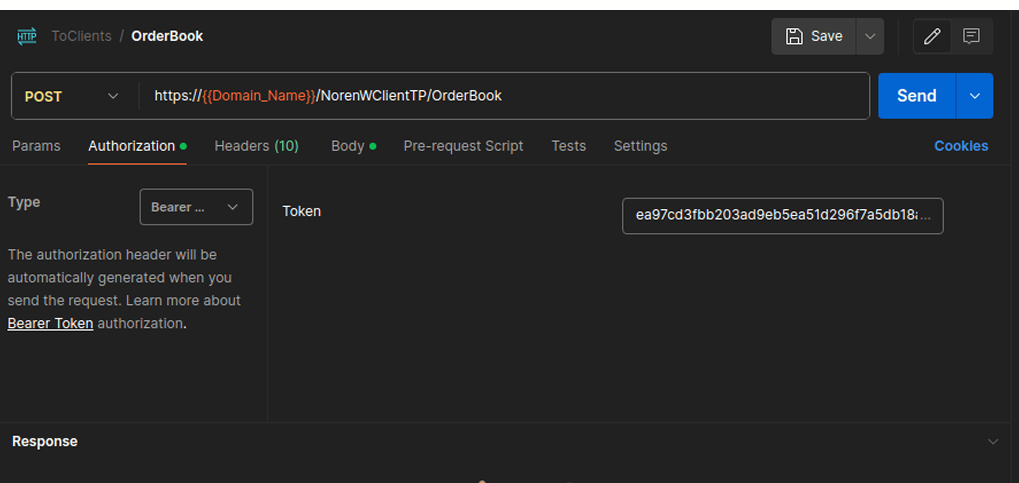
Include the access_token (64 characters, no dashes) in the Authorization header when making each individual API call:
Authorization: Bearer <access_token>The interactive API playground on each endpoint page includes an Authorization Token field. Enter your access_token once and it is reused across pages while you browse the docs.
Request to be POSTed to url : /NorenWClientAPI/GenAcsTok
Request Details
| Parameter Name | Possible value | Description |
|---|---|---|
| jData* | Should send json object with fields in below list |
| Json Fields | Possible value | Description |
|---|---|---|
| code* | code will get from successful login url | |
| checksum* | It is a SHA-256 hash created from the combination of the app key, secret key, and code without any spaces. Example: If your app key is ABC, secret key is 123, and code is x1y2z3, combine them as ABC123x1y2z3, then generate the SHA-256 hash of that string. |
Example:
curl -location 'https://api.infinn.in/NorenWClientAPI/GenAcsTok' \
-d 'jData={"code":"v1c6d38b-7c0e-46e4-8abe-acb1f6a15089","checksum":"c5f9e0537cfa219885495ace4930b38280a39790ad43a4e713afd27e6ec93c5"}'
Response Details
Response data will be in json format with below fields.
| Json Fields | Possible value | Description |
|---|---|---|
| stat | Ok or Not_Ok | Login Success Or failure status |
| uname | User name | |
| actid | Account id | |
| Email id | ||
| brkname | Broker id | |
| uid | User id | |
| cnm | Company Name | |
| emsg | Display message (It will be present only in case of errors.) | |
| access_type | Access Type | |
| access_token | Access Token | |
| refresh_token | Refresh Token | |
| expires_in | Access Token Expire date | |
| request_time | It will be present only on login success. |
Sample Success Response:
{
    "request_time":"20:18:47 19-05-2020",
    "stat":"Ok",
    "access_token":"e49d37bb203ad9eb5ea512d967fad5b18af504814a6b90209e21aa76e687c",
    "expires_in":"1756990407",
    "refresh_token":"51444ac9b561e007411425d440012a6d41a0d49f1413de26c1d400d52143b79",
    "lastaccesstime":"1589897972"
}
Sample Failure Response:
{
    "stat":"Not_Ok",
    "emsg":"Invalid Input : INVALID_VERIFIER",
    "uid":"TEST"
}
This Postman screenshot demonstrates how to include the access token in the request header under the Authorization field.